


For SEO professionals, organic CTR (click-through rate) is a vital indicator of how effectively your pages turn search impressions into clicks. It’s one of the key SEO performance metrics that shows how appealing your content is in search results.

In this post, we’ll explain what organic CTR is, why it matters for SEO, how to calculate it manually (including the click-through rate formula), and how a CTR calculator can streamline that process.
We’ll also share practical examples and benchmarks for good CTRs in Google Search, explain how to interpret your CTR results, and outline how to act on low CTR, including tips to improve organic CTR. Let’s dive in.
What Is Organic CTR (Click-Through Rate)?
Click-through rate (CTR) is the percentage of users who click on your page after seeing it in search results. More formally, it’s the ratio of clicks to impressions expressed as a percentage. In other words, if your page was shown 100 times (impressions) and received 7 clicks, the CTR is 7%. Organic CTR refers specifically to this metric for organic (non-paid) search results.
The Click-Through Rate Formula
The formula for calculating CTR is straightforward:
CTR = (Number of Clicks / Number of Impressions) * 100%
For example, if a page gets 150 clicks out of 7,500 impressions, the CTR would be 2%. You can obtain these numbers from tools like Google Search Console or analytics platforms. Essentially, CTR = clicks ÷ impressions × 100%. This simple click-through rate formula gives a quick measure of how often searchers who see your snippet actually click through to your site.
Why CTR Matters for SEO
CTR isn’t just a vanity metric – it has real implications for your SEO success. First, a higher organic CTR means more free traffic. Even if your ranking stays the same, increasing a keyword’s CTR means more visitors to your site. Focusing on CTR lets you maximise traffic without needing a higher rank. In that sense, CTR is an SEO performance metric that directly reflects how engaging and relevant your snippet is to searchers.
Secondly, while Google maintains that CTR isn’t a direct ranking factor, evidence suggests it can influence rankings indirectly. When many users click your result (especially relative to your position), it signals to search engines that your content is attracting interest and matching searcher intent. This user engagement can potentially lead to a boost in rankings over time. In short, a strong CTR tells search engines that you have content people want to read, which often correlates with better rankings and more organic traffic.
Finally, CTR helps you gauge user engagement with your search snippets. If you have a high CTR, it indicates your title and meta description are effectively enticing your target audience to click. A low CTR, on the other hand, flags an opportunity: it suggests your snippet isn’t resonating with searchers, even if you’re getting impressions. This makes CTR a valuable diagnostic metric for SEO – it helps identify pages or keywords that are under-performing in the SERPs and could be optimised further.
How to Calculate CTR Manually
Calculating CTR manually is easy with the formula above, but doing it regularly for many pages or keywords can become tedious. Here’s how you would calculate CTR step-by-step:
- Gather impressions and clicks: Use a source like Google Search Console to find how many impressions and clicks a page (or keyword) received over a given period.
- Apply the formula: Divide the number of clicks by the number of impressions.
- Convert to percentage: Multiply the result by 100 to get a percentage. For example, 50 clicks ÷ 1,000 impressions = 0.05, which is 5% CTR.
Even though the math is simple, tracking this across dozens or hundreds of pages can be time-consuming. This is where using a dedicated tool or CTR calculator becomes helpful.
How CTR Calculators Streamline the Process

Manually computing CTR for multiple pages or campaigns can turn into busywork for a busy SEO pro. A CTR calculator tool automates this process, saving you time and reducing the chance of errors. For example, instead of juggling spreadsheets or doing mental math, you can input your total clicks and impressions into a calculator and get the CTR instantly – no formulas to remember. This eliminates the risk of small math mistakes that could lead to incorrect conclusions or reporting errors.
CTR calculator tools essentially act as quick helpers: they skip the spreadsheet formulas and crunch the numbers for you in seconds. Many online marketing platforms offer free CTR calculators where you just plug in impressions and clicks to see the rate. This is especially handy if you’re pulling data from multiple sources (for example, comparing CTR across different search engines or campaigns) and want a fast, unified calculation. In short, using a CTR calculator lets you spend less time on arithmetic and more time on analysis and optimisation of your SEO campaigns.
Moreover, some tools don’t just calculate the rate but also help you interpret it. They might allow you to compare your CTR against benchmarks or past performance. For instance, you could quickly test “What if” scenarios (like how many clicks you’d need to reach a higher CTR percentage) without fiddling with formulas. In an agency or in-house team setting, a CTR calculator also speeds up reporting – you can instantly show stakeholders the click-through performance of various pages or keywords.
What Is a “Good” Organic CTR? (Benchmarks & Examples)
Typical click-through rates by Google Search position. As a rule, higher-ranking results earn a much larger share of clicks than lower ones. For example, the #1 organic result often captures around 30–40% of clicks, whereas a result down at #5 might only get about 5% of the clicks. In the illustrated example above, the top-ranked result has a 39.8% CTR, while the results in positions 3–4 see their CTR drop to around 10% or lower. This sharp decline shows how crucial those top positions are for attracting traffic.
In general, organic CTR varies by ranking position (and other factors like industry and query type). One study found position 1 gets roughly 39.8% of clicks on average, position 2 around 18.7%, position 3 about 10.2%, and position 5 only ~5%. This means that what qualifies as a “good” CTR depends heavily on where you rank. A 5% CTR could be excellent if you’re ranking in the 5th spot (above average for that position), but a 5% CTR would be very poor if you rank #1.
It’s important to compare your pages’ CTR against relevant benchmarks. Look at the average CTR for your position and industry. For instance, if most #3 ranking pages in your sector get ~10% CTR and your page at #3 is only getting 4%, that’s a sign your snippet might need improvement. On the other hand, if you’re hitting 20% in a spot where the average is 10%, your snippet is outperforming expectations. Also consider the intent and features on the search results page: a navigational query for a known brand might naturally have a very high CTR for the top result, whereas an informational query with a featured snippet or other SERP features might lower the CTR for everyone on that page.
Industry benchmarks can provide context as well. Some industries or query types inherently have different CTR curves. (For example, searches with clear commercial intent often have higher CTR on the top results than broad informational searches, where users might browse more results or get answers directly on the SERP.) Ultimately, “good” CTR is relative – you need to factor in your ranking position, the type of query, and the presence of ads or rich results when evaluating your click-through rate.
Interpreting CTR Results and Diagnosing Low CTR
Interpreting your organic CTR in context will help you pinpoint issues and opportunities. Start by looking at pages or queries where CTR is lower than expected. For example, say one of your pages is consistently ranking in the top 3 for a keyword, but its CTR is only around 3%. If the average CTR for top-3 positions in your niche is significantly higher, this is a red flag. It suggests that while you’re getting impressions (the page is visible in results), something about your listing isn’t convincing users to click.
A common reason for low CTR despite high impressions is that your metadata isn’t compelling or isn’t matching search intent. As one guide notes, if you have high impressions but low CTR, it often means your page is showing up for the query, but the title/tagline isn’t doing the “heavy lifting” to entice clicks, possibly indicating the page is targeting the wrong keywords or needs a better snippet. In practice, this could mean your title tag might be off-target, unclear, or unappealing to searchers, or your meta description doesn’t highlight why the user should click.
Another scenario is when CTR is low because of SERP features or competition. If a featured snippet, knowledge panel, or a pack of ads is present, users might get their answer without clicking any result, or they might be drawn to a more prominent result. Keep this in mind: a below-average CTR isn’t always your fault – sometimes the search results page layout depresses clicks for everyone. However, even in those cases, you should ensure your snippet is as enticing as possible relative to others.
On the flip side, if you find pages with high CTR but low conversions or high bounce rates, it might mean your title/meta are attracting clicks, but the content isn’t meeting user expectations. That’s a sign to align your page content with what the snippet promises, so that users don’t leave disappointed. In general, CTR paired with other metrics (bounce rate, time on page, conversion rate) gives a fuller picture of performance: CTR gets the visitor through the door, and the on-page experience determines what they do next.
Using Google Search Console (GSC) to spot CTR issues: GSC’s Performance report is extremely useful for diagnosing CTR. You can filter queries by position and CTR to find opportunities. For instance, filter to show queries where your average position is say 1–3 (top positions) but the CTR is below a certain threshold (e.g. below 5%). These are high-priority cases to fix. GSC lets you identify which pages/queries on your site have a high impression count but unusually low CTR, so you can then focus on improving those. Tracking these metrics over time will also reveal if your changes are effective – you should see CTR lift if your optimisations hit the mark.
How to Improve Organic CTR (Actionable Tips)

If you’ve identified pages with subpar CTR, don’t worry – there are concrete steps you can take to improve organic CTR. Here are some proven strategies for lifting your click-through rates:
- Match Title Tags to Search Intent: Your page title is the first (and often most important) thing users see. Make sure your title tag aligns with what people are searching. Use the primary keyword in the title and make it clear that your content addresses their query. By matching users’ search queries in your title, you increase the chances they see your result as relevant. For example, if people search “best SEO tools 2025,” a title like “Top 10 SEO Tools for 2025 – Improve Your Rankings” directly signals relevance and timeliness.
- Write Compelling Meta Descriptions: While Google sometimes rewrites meta descriptions, a well-crafted one can still improve CTR by appealing to user needs. Treat the meta description as a mini ad for your page – highlight the benefit or unique value the user will get by clicking. Include a call-to-action or an intriguing snippet of information. For instance, “Learn how to boost your organic CTR with 5 proven techniques – one of them increased our traffic by 20%!” This kind of copy can entice curiosity and clicks. (And remember to ensure the meta description is actually relevant to the content to meet user expectations.)
- Use Schema Markup for Rich Results: Enhancing your search snippet with rich results can significantly improve CTR. Implement structured data (schema) relevant to your content, such as FAQ schema, HowTo schema, review ratings, etc. These elements can make your listing more eye-catching (for example, star ratings on a product, or drop-down FAQs below your link). The additional information and visual enhancements make your listing more attractive to click, and evidence shows these rich snippets do improve CTR. Even a simple Breadcrumb or Sitelinks schema can add extra lines that increase your snippet’s real estate on the SERP, drawing the eye.
- Optimise for Featured Snippets (Carefully): Ranking as a featured snippet can be a double-edged sword – it gives you prime visibility, but if the snippet fully answers the query, some users won’t click through. That said, being the featured snippet often still drives a lot of clicks, especially for more complex questions. Structure your content to directly answer common questions (for example, using Q&A formats or clear definition sentences) to increase your chances of capturing a featured snippet. If you do hold a featured snippet and see a CTR drop, evaluate if you can tweak the snippet content to leave users wanting more so they click through, or provide a teaser that encourages the click.
- Leverage Power Words and Freshness in Titles: Make your titles stand out by using descriptive, engaging language. Power words that convey urgency or value (e.g. “ultimate”, “proven”, “free”, “new”) can improve click-through appeal, as long as they’re relevant and not clickbait. For example, “10 Proven Strategies to Improve Organic CTR” might attract more interest than a generic “How to improve CTR”. Additionally, if appropriate, include the current year or other freshness cues in your title to show that your content is up-to-date (e.g., “Best SEO Practices (Updated 2025)”). Caution: Only do this if you are prepared to keep the content updated; a current year can boost CTR by indicating relevance, but outdated content with a current year can backfire. Always ensure the content matches the promise.
- Improve Your Ranking (Long-Term): It might sound obvious, but one sure way to increase organic CTR is to rank higher. The first page (and especially the top 3 positions) gets the lion’s share of clicks. Applying broader SEO strategies – quality content, on-page optimisation, link building, faster site speed, etc. – to push your rankings up will naturally lift CTR. For pages stuck at the bottom of page 1 or on page 2, you may need to boost their authority and relevance to move up. Even as you work on that, you can still optimise the snippet to capture as many clicks as possible at your current position. The goal is to close the gap between your current CTR and the maximum possible CTR for your rank position (and then improve the rank).
- Test and Iterate: Treat your meta titles and descriptions as elements you can A/B test. While Google doesn’t provide an easy A/B testing mechanism for organic snippets, you can make a change and monitor CTR changes in Search Console over a few weeks. Try different phrasing, include different keywords, or test adding a symbol or bracketed phrase (like “[Guide]” or “[Free Checklist]”) in the title. Some studies have found that adding brackets with content type can increase clicks significantly, as it sets expectations. Monitor the impact and keep the version that performs better. Over time, these incremental improvements add up.
Lastly, ensure your content delivers on the snippet’s promise. Improving CTR will drive more visitors to your site; make sure they find what they came for. Satisfied users (who don’t bounce back to Google immediately) send positive signals and are more likely to convert or engage, which is the ultimate goal of SEO. In summary, a combination of relevance, clarity, and persuasiveness in your snippet will help turn more impressions into clicks.
Recommended CTR Calculator Tools and Resources
To effectively track and optimise your click-through rates, here are some useful tools and resources:
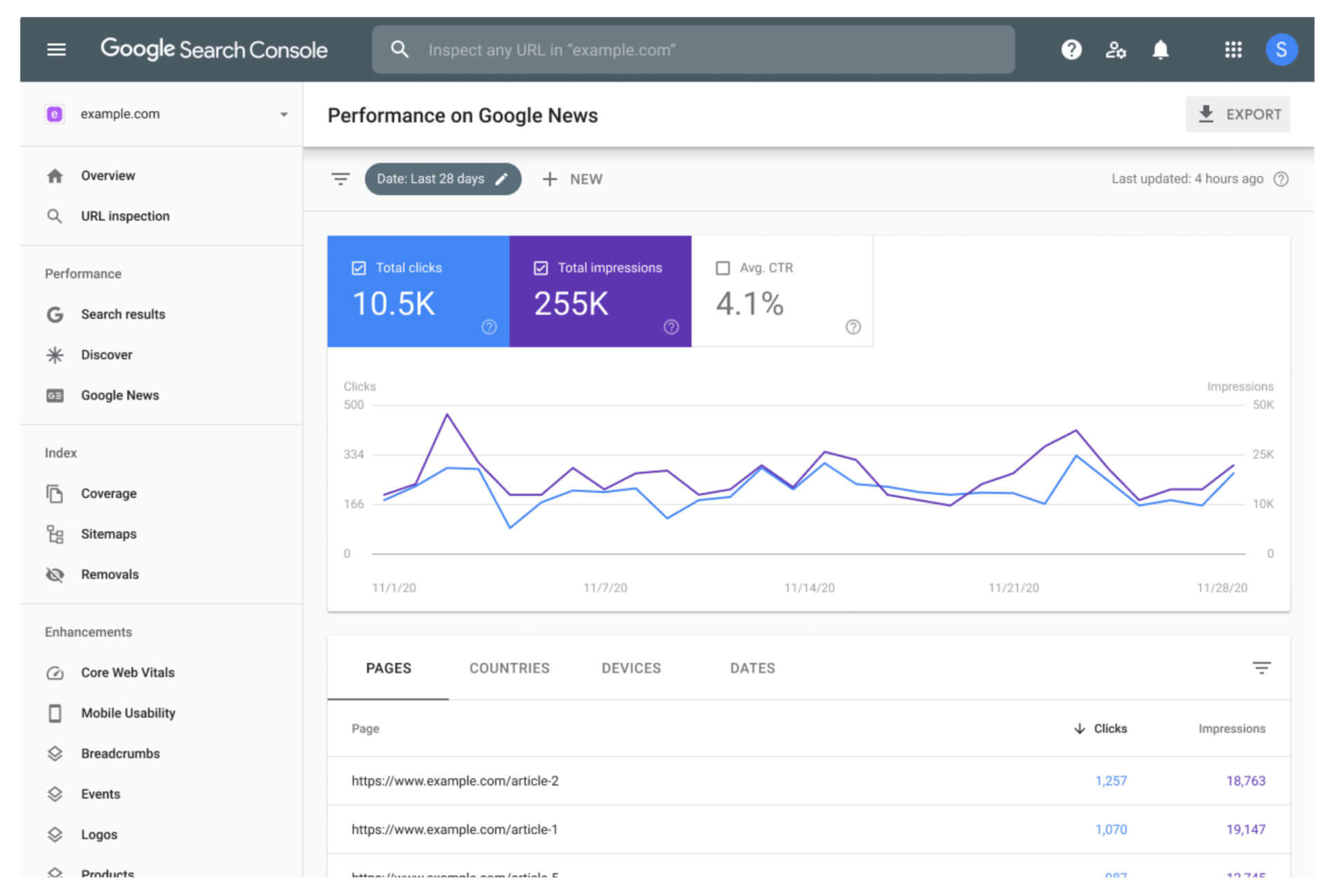
- Google Search Console (Performance Report): Google Search Console is arguably the most important tool for monitoring organic CTR on your own site. It automatically calculates CTR for each page and query your site appears for, based on actual Google search data. In GSC, you can easily identify pages or keywords with high impressions but low CTR and monitor CTR trends over time. It’s an indispensable (and free) resource for SEO professionals to track organic performance metrics like CTR, average position, and more.
- Free Online CTR Calculators: If you need to calculate CTR quickly for any scenario (not just your own site data), there are free calculators available. These tools let you input the number of clicks and impressions and will output the CTR percentage immediately. For example, AgencyAnalytics offers a free CTR Calculator that instantly computes the rate so you don’t have to do the math yourself. Similarly, WebFX provides a handy click-through rate calculator that automates the formula and gives an immediate result. These are useful for sanity-checking metrics or when compiling reports from multiple sources. They eliminate manual errors and save time when dealing with multiple campaigns or clients.
- CTR Benchmark Tools (Advanced Web Ranking’s CTR Tool): To understand what a “normal” CTR is for your position or industry, tools like the Advanced Web Ranking Organic CTR Benchmark tool can help. AWR’s free tool compiles millions of data points to show average CTR curves for Google by position, device, and industry. You can use it to compare your own CTR by position against industry averages. For instance, you can select your industry (e.g. finance, ecommerce, etc.) and see that in your sector, the average CTR for position 2 might be, say, 12%. If your page in position 2 is only getting 5%, you know you’re below par and have room to improve. Benchmarking tools like this provide valuable context when setting CTR goals.
- SEO Analytics Platforms: Many SEO tools and platforms (such as Moz, Semrush, Ahrefs, etc.) incorporate CTR data and allow tracking it alongside rankings. Some have features to highlight pages with a CTR “underperformance” (where your CTR is lower than expected for your rank). They might also integrate with Google Search Console data to surface CTR insights. If you’re already using an SEO platform, check if it offers CTR analysis features or reports.
Internal Resources: Don’t forget to continuously educate yourself and your team about CTR and snippet optimisation. Reading case studies or guides (like this one) on improving organic CTR can spark ideas. For a deeper dive into related metrics, check out our guide on SEO performance metrics for a holistic view of how CTR works alongside other KPIs. Additionally, our in-depth article on 15 Ways to Improve Organic CTR offers a step-by-step walkthrough of advanced techniques to increase your click-through rates.
Conclusion
Tracking and optimising organic CTR is an essential part of maximising your SEO performance. A high CTR means you’re successfully attracting your target audience’s clicks, which leads to more traffic without needing higher rankings. By understanding what your click-through rate is and using tools like CTR calculators and GSC data, you can quickly identify where you’re excelling and which pages need attention. Remember that CTR is not set in stone – small changes to your titles, descriptions, or content can have a big impact on whether users decide to click your result or skip it.
In summary, use the CTR formula to keep an eye on your metrics, leverage a CTR calculator to save time, compare against benchmarks to define “good” CTR for your situation, and apply best practices to continually improve organic CTR on your site. By doing so, you’ll not only boost your organic traffic but also send positive signals to search engines that could enhance your rankings over time. Happy optimising, and may your CTRs forever be on the rise!
References
- Understanding organic CTR
- Importance of CTR for SEO
- Calculating CTR (formula and example)
- Benefits of CTR calculators
- Google Search CTR benchmarks by position
- Diagnosing low CTR from impressions
- Title tag optimisation for CTR
- Rich snippets improving CTR
- Using GSC to track CTR
- Industry CTR comparison tool


